PWA: No App Store Required
Install the Slotlounge Progressive Web App directly from your mobile browser. No Google Play listing, no App Store approval, no storage-heavy download required.
Slotlounge App
Install the Slotlounge Progressive Web App on your phone in under a minute. Full access to 17,000+ pokies, live casino, AUD banking, and all bonuses, with no app store required.
The Slotlounge Mobile Experience
Install the Slotlounge Progressive Web App on your phone in under a minute. Full access to 17,000+ pokies, live casino, AUD banking, and all bonuses, with no app store required.
Get the App Play responsibly: gambling can become a habit that is hard to break. Must be 18+. Bonus terms apply.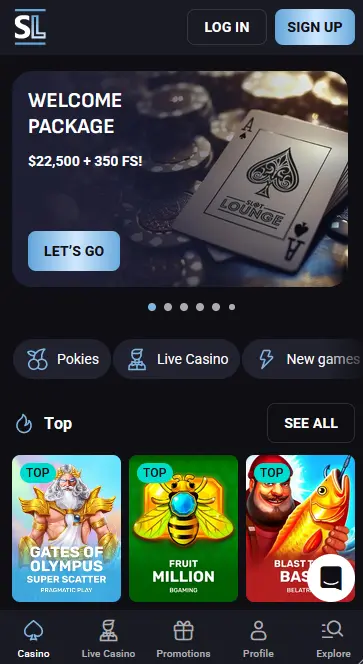
How to Install the Slotlounge App
Staying Secure on Mobile
What You Should Do
What You Should Avoid
What the Slotlounge App Delivers
PWA: No App Store Required
Install the Slotlounge Progressive Web App directly from your mobile browser. No Google Play listing, no App Store approval, no storage-heavy download required.
Full Lobby, Instant Loading
The SOFTSWISS mobile platform loads all 17,000+ games, the live casino from Evolution Gaming and Ezugi, the cashier, and the bonus promotions at native-app speed.
128-bit SSL on Every Session
Your login credentials, AUD balance, and payment details are protected by 128-bit SSL encryption on every connection, identical to the desktop security environment.
Slotlounge App: Strengths and Trade-offs
Pros
Cons
Device Compatibility
Android
iOS
Slotlounge delivers its mobile experience as a Progressive Web App rather than a native application listed on Google Play or the App Store. This means the full casino, every game, every bonus, and every payment option available on desktop is equally accessible from your phone. Nothing is stripped back for the mobile version.
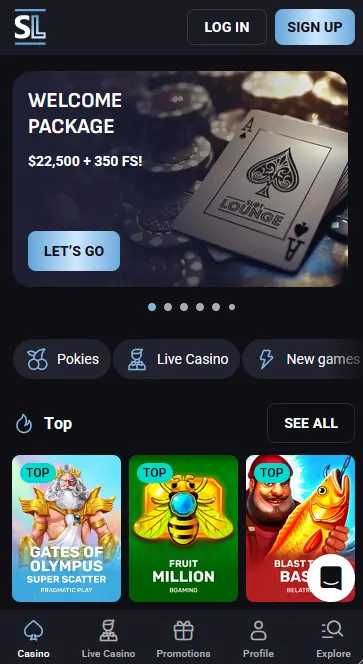
The PWA runs on the SOFTSWISS mobile platform, which automatically adapts every screen, menu, and game to the size of your display. The game lobby presents all 17,000-plus titles with the same filtering options available on desktop: search by provider, by game mechanic (Megaways, Hold and Win, bonus-buy slots), or by category (pokies, jackpots, live casino, game shows). Evolution Gaming and Ezugi live tables load directly within the PWA without switching to an external viewer.
The cashier inside the app is a complete replica of the desktop version. You can deposit via Visa, Mastercard, Apple Pay, Google Pay, Neosurf, MiFinity, Skrill, Neteller, cryptocurrency, and bank transfer. Withdrawals in AUD are processed through the same methods. All promo codes, including the welcome package codes FIRST through FOURTH, the Live Reload code LIVE, and the no-wagering crypto bonus code CRYPTO, are entered at the app cashier exactly as they would be on desktop.
The main practical difference between using the PWA and opening the site in a mobile browser tab is convenience: the PWA sits on your home screen and opens immediately without navigating through a browser. On iOS, Safari’s Progressive Web App support enables biometric authentication (Face ID or Touch ID) through the browser’s credential manager, so returning players can access their account with a fingerprint or face scan instead of typing their password each time. The casino itself, its odds, its RNGs, its game outcomes, and its security environment are identical across both access methods.
Slotlounge’s PWA runs on any device with a modern browser. The installation process differs slightly between Android and iOS, but the resulting experience is functionally the same once the icon is on your home screen.
Chrome version 80 or later on Android 8.0 (Oreo) or higher is the recommended configuration. On these devices, Chrome detects the Slotlounge PWA automatically and may present a banner at the bottom of the screen suggesting you add it to your home screen. If the banner does not appear, open Chrome’s three-dot menu, select Add to Home Screen, and confirm. The icon appears on your home screen immediately.
Safari is the required browser on iPhone and iPad because iOS restricts PWA installation to Safari only; Chrome and Firefox on iOS cannot trigger the Add to Home Screen flow. iOS 13 or later is recommended for full PWA compatibility, including background loading and home-screen display. To install, tap the Share icon in Safari (the box with an upward arrow at the bottom of the screen), scroll the share sheet until you see Add to Home Screen, and tap it. Confirm the name and tap Add.
The table below summarises the minimum setup for each platform.
| Platform | OS Version | Browser | Install Method |
|---|---|---|---|
| Android | 8.0 (Oreo) or later | Chrome 80 or later | Chrome three-dot menu |
| iOS | iOS 13 or later | Safari (required) | Safari Share button |
Every title in the Slotlounge catalogue is accessible from the mobile app without any titles restricted to desktop only.
The full pokie library of 17,000-plus titles is available. BGaming titles Book of Cats and Wild Cash x9990 (used for the welcome bonus free spins) load instantly in the PWA. High-volatility titles from Hacksaw Gaming and Nolimit City, Megaways games from Big Time Gaming, and PopWins pokies from AvatarUX Studios all perform at the same frame rate and RTP as on desktop, using the same certified random number generator.
Evolution Gaming’s live lobby, including Monopoly Live, Mega Wheel, Money Drop Live, and Snakes and Ladders Live, streams directly in the PWA with no quality reduction compared to the desktop experience. Pragmatic Play Live’s Gates of Olympus Roulette and Ezugi tables are also fully accessible. The Live Reload bonus (code LIVE, 50% up to $1,500, 20x wagering) can be activated through the app cashier and used on any of these live tables.
RNG versions of blackjack, roulette, baccarat, and poker from Betsoft Gaming and NetEnt are available in both real-money and demo mode. Demo mode lets you play without a real-money stake, which is useful for learning the table rules on a smaller screen before switching to real play or the live casino section.
The jackpot section includes stand-alone and linked progressive titles from Betsoft Gaming, Red Tiger Gaming, and Playtech. Red Tiger’s linked network covers 200-plus games sharing the same prize pool, with a daily must-win jackpot. Playtech’s Age of the Gods series and its four progressive tiers are also available. Note that jackpot titles are excluded from bonus-mode play under the Slotlounge bonus terms.
Slotlounge operates the mobile environment under the same security architecture as the desktop site, which is certified under Curaçao Gaming Control Board licence OGL/2024/161/0191.
Every session in the PWA, from login through gameplay to cashier transactions, runs over 128-bit SSL encryption. This is the same standard used by major Australian banks for internet banking. Payment credentials are processed by certified third-party payment providers rather than stored on Slotlounge’s own servers, which limits the exposure of your financial details.
While Slotlounge does not currently offer a dedicated two-factor authentication toggle within the account settings, the platform applies automatic device-confirmation emails when you sign in from a new browser or device. This email confirmation acts as an out-of-band second step that must be completed before the session is fully active.
On iOS devices running Safari with biometric unlock enabled, Face ID or Touch ID can authenticate your saved Slotlounge credentials without typing your password. On Android, Chrome’s credential manager supports fingerprint unlock on compatible devices. Both options are controlled through your device’s browser or system settings rather than inside the Slotlounge app itself.
The full range of payment methods available on desktop is also accessible within the app cashier. AUD is the account currency, so all transactions settle in Australian dollars.
Deposits via Visa, Mastercard, Apple Pay, Google Pay, Neosurf, Skrill, Neteller, MiFinity, MuchBetter, eZeeWallet, and bank transfer are all available from the app. Cryptocurrency deposits (Bitcoin, Ethereum, Litecoin, Tether, Dogecoin, and others) can also be initiated from the mobile cashier, and each crypto deposit qualifies for the 5% crypto bonus (code CRYPTO) with zero wagering attached.
| Method | Deposit | Withdrawal |
|---|---|---|
| Visa / Mastercard | Instant | 1-3 banking days |
| Apple Pay / Google Pay | Instant | Up to 24 hours |
| Skrill / Neteller / MiFinity | Instant | Up to 24 hours |
| Cryptocurrency | Minutes | Up to 24 hours |
| Bank Transfer | Up to 5 banking days | 3-5 banking days |
Minimum deposit and withdrawal is $30 AUD. The weekly withdrawal limit is $4,500 AUD and the monthly limit is $22,500 AUD.
All cashier operations in the app use the same 128-bit SSL layer as desktop. Contactless payment methods such as Apple Pay and Google Pay add their own device-level biometric authentication layer before any transaction is authorised, providing a second independent security check on every deposit made via those methods.
If you have not yet registered, you can do so entirely within the PWA. Tap Register from the Slotlounge home screen, enter your email address and a password, confirm you are 18 or older, and your account is active immediately. There is no requirement to register first on desktop and then link your account to mobile: the mobile registration is full and complete. On your first qualifying deposit of $30 or more, enter the code FIRST to claim 100% up to $3,000 AUD plus 200 free spins on Book of Cats by BGaming.
Enter your registered email and password on the app’s sign-in screen. If you have saved your credentials in your browser’s password manager and enabled biometric unlock, a fingerprint or Face ID scan completes the login instead. A device-confirmation email may be required on first login from a new phone. For troubleshooting login problems, visit the login help page.
Every bonus available at Slotlounge can be claimed through the app. The four-stage welcome package (up to $22,500 AUD plus 350 free spins), all daily reload offers, the Live Reload (code LIVE, 20x wagering), and the no-wagering crypto bonus are all accessible from the mobile cashier. Players aged 18 and over can participate in all promotions. For the complete breakdown of conditions, wagering multipliers, validity periods, and excluded games, see the full bonus terms.
Live chat is accessible from a persistent icon in the lower corner of the PWA at all times. Support agents respond within seconds during peak hours and are available around the clock, covering AEST and AEDT hours without any service reduction overnight or on weekends. Email support is available at [email protected] for matters that do not require an immediate response.
Deposit limits, loss limits, wagering limits, and session reminders are all configurable under your account profile within the app. A cooling-off period and full self-exclusion are also available from the same menu. These tools take effect immediately upon activation. The minimum age to play at Slotlounge is 18. If you have concerns about your gambling habits, use the account controls directly or contact the support team for guidance on the available options.
App Questions Answered
No. Slotlounge is not listed on Google Play or the App Store. The casino delivers its mobile experience through a Progressive Web App installed via your Android Chrome or iOS Safari browser.
PWA functionality requires Android 8.0 (Oreo) or later with Chrome 80 or above for reliable performance. Older versions may load the mobile browser site but the Add to Home Screen install prompt may not be available.
Yes. The app cashier is identical to the desktop cashier, so all promo codes including LIVE (Live Reload, 50% up to $1,500, 20x wagering) and CRYPTO (5% crypto deposit match, 0x wagering) can be entered at the time of deposit.
The PWA updates automatically when you launch it with an active internet connection, as it fetches the latest version from slotloungeslots.com each time. There is no manual update process through an app store.
Install Slotlounge on Your Phone
Grab 350% up to $22,500 and 350 free spins.
Enter Casino Play responsibly: gambling can become a habit that is hard to break. Must be 18+. Bonus terms apply.